
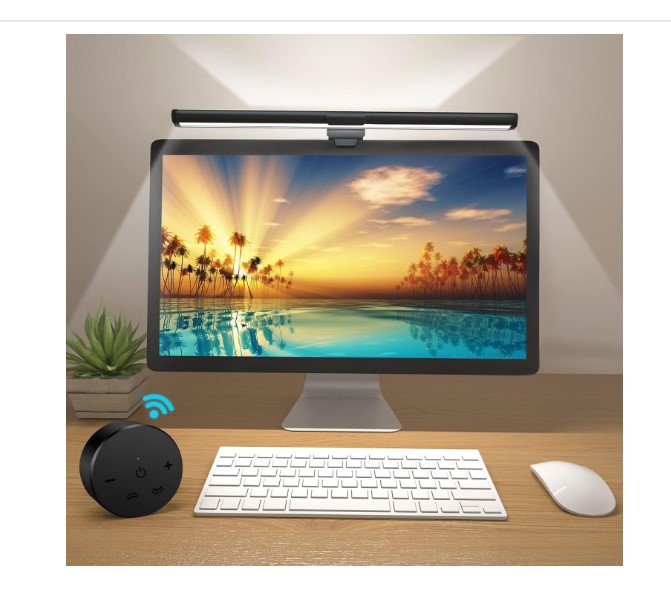
Working late at night or spending long hours in front of a computer screen can take a toll on your eyes. That’s where monitor light bars and eye-care desk lamps come in. These innovative lighting solutions are designed to reduce eye strain, enhance visibility, and improve focus—whether you’re working, gaming, or reading.
In this blog, we’ll explore the top 5 best monitor light bars available on Liibe.com that are perfect for U.S. users who value comfort, performance, and smart design.
Why Choose a Monitor Light Bar?
Before we dive into our top picks, let’s understand why monitor light bars are becoming a must-have accessory in modern workspaces.
1. Eye Comfort and Reduced Strain
Traditional desk lamps can cause glare on your screen or uneven lighting. A monitor light bar, however, illuminates your workspace evenly without reflecting on your display, protecting your eyes from fatigue and headaches.
2. Space-Saving Design
Since these lamps attach directly to your monitor or have compact bases, they save valuable desk space—perfect for minimalist setups or small home offices.
3. Adjustable Brightness & Color Modes
Most modern light bars come with customizable brightness and color temperatures, letting you create the perfect ambiance for focus, relaxation, or creativity.
4. Aesthetic Appeal
Beyond functionality, these sleek lights add a professional and modern look to your setup—ideal for video calls, streaming, or creative studios.
Now, let’s review the top-rated monitor light bars available at Liibe.com that combine style, comfort, and innovation.
1. Quntis RGB Backlight Monitor Light Bar Desk Lamp (15 Modes, Dimmable)
The Quntis RGB Monitor Light Bar is a game-changer for anyone who wants to add vibrant color and mood lighting to their workspace.
Key Features:
-
15 RGB lighting modes – switch between professional white tones or colorful RGB scenes for gaming.
-
Stepless dimming – control brightness to match your preference.
-
USB-powered design – plug directly into your PC or power bank.
-
Anti-glare technology – ensures no reflection on the screen, keeping your eyes comfortable for long work hours.
Why It’s Great:
It’s perfect for multitaskers who use their workspace for both work and play. Whether you’re editing videos or gaming, the Quntis light bar enhances your mood and reduces strain.
2. OOWOLF Monitor Light Bar RA95 Eye-Caring USB LED Task Lamp
The OOWOLF Monitor Light Bar is designed with precision lighting and high color accuracy to keep your workspace bright and natural.
Key Features:
-
RA95 high color rendering index (CRI) – offers true-to-life lighting similar to daylight.
-
Touch control – intuitive and easy to use.
-
Adjustable color temperature – choose from warm to cool tones for reading, working, or relaxing.
-
USB-powered convenience – energy-efficient and compatible with most devices.
Why It’s Great:
Perfect for professionals and students alike, the OOWOLF light bar delivers balanced illumination that keeps your focus sharp without causing glare or shadows.
3. Architect Lamp with Clamp Dual Screen Gooseneck Smart Light
For users who work across multiple monitors or need a flexible setup, the Architect Lamp with Clamp is a premium pick.
Key Features:
-
Dual gooseneck arms – independently adjust lighting angles for multiple screens.
-
Strong clamp design – easily attaches to any desk edge without taking up space.
-
Smart light technology – automatically adjusts brightness based on ambient light.
-
Eye-care LEDs – flicker-free and glare-resistant for extended work sessions.
Why It’s Great:
This is the best choice for designers, developers, and architects who need precision lighting and maximum adjustability. The modern design also makes it a stunning addition to any workspace.
4. Yeelight Monitor Light Bar Computer Lamp (250lm, Eye Care, Touch Control)
The Yeelight Monitor Light Bar stands out with its elegant design and intelligent lighting control—ideal for modern workstations.
Key Features:
-
Stepless dimming – smooth adjustment for brightness levels.
-
Touch-sensitive controls – minimalistic and user-friendly.
-
Eye-care LED technology – reduces blue light and flicker for better comfort.
-
250 lumens output – perfect for home offices and reading setups.
Why It’s Great:
Yeelight combines sleek design with practical lighting performance. It’s great for professionals who value aesthetics and ergonomics in their workspace.
5. Eye-Care USB Reading LED Task Lamp for Monitor (Touch Control)
This Eye-Care USB Reading Lamp is compact yet powerful—ideal for students, readers, and office workers who spend long hours at their desk.
Key Features:
-
Touch control system – seamless adjustment for brightness and color modes.
-
USB-powered – compatible with laptops, PCs, and portable chargers.
-
Soft, even light – protects against glare and flicker.
-
Minimalist design – blends easily with any monitor or desk setup.
Why It’s Great:
It’s a budget-friendly option that doesn’t compromise on quality. Compact, energy-saving, and elegant—this lamp ensures your eyes stay comfortable all day long.
Buying Guide: How to Choose the Best Monitor Light Bar
When selecting the right monitor light bar, consider these key factors:
1. Brightness & Color Temperature
Opt for models with adjustable brightness and temperature so you can customize lighting for day or night use.
2. Eye Protection
Ensure the light is flicker-free and anti-glare, minimizing digital eye strain during long screen hours.
3. Mounting Style
Choose between clip-on monitor lights or clamp-based lamps depending on your desk setup.
4. Power Source
USB-powered options are convenient and energy-efficient—ideal for compact workstations.
5. Aesthetic & Build Quality
A good light bar should complement your workspace and feel durable. Look for metal builds or matte finishes for a professional look.
For the best value, explore Liibe’s full lighting collection at Liibe.com.
Frequently Asked Questions (FAQs)
Q1. Are monitor light bars worth it?
Absolutely! They reduce glare, minimize eye strain, and help maintain focus, especially for people who work late or in dim lighting.
Q2. Can I use these lamps with any monitor size?
Yes, most models have universal clips or adjustable mounts that fit various monitor sizes from 17” to 34”.
Q3. Do light bars consume a lot of power?
No. These are USB-powered LED lights, which are energy-efficient and eco-friendly.
Q4. What’s the ideal color temperature for work?
For productivity, 4000K–5000K (neutral white) is recommended. For relaxation, use 2700K–3000K (warm white).
Q5. Can these be used for gaming setups?
Yes! RGB models like the Quntis Light Bar are perfect for gaming, offering colorful ambient lighting and immersive visuals.
Final Thoughts
A high-quality monitor light bar is no longer a luxury—it’s a necessity for anyone working or studying in front of screens for long hours. The right lighting can improve productivity, enhance comfort, and even elevate your setup’s style.
Whether you’re a gamer, designer, or office professional, these five models from Liibe.com deliver the perfect balance of design, performance, and eye-care innovation.
👉 Explore more lighting solutions and smart accessories today at Liibe.com—where technology meets comfort.